> ## Documentation Index
> Fetch the complete documentation index at: https://docs.logaflow.com/llms.txt
> Use this file to discover all available pages before exploring further.
# Webhook
> Integrate Logaflow into any workflow using our webhooks events for new feedback.
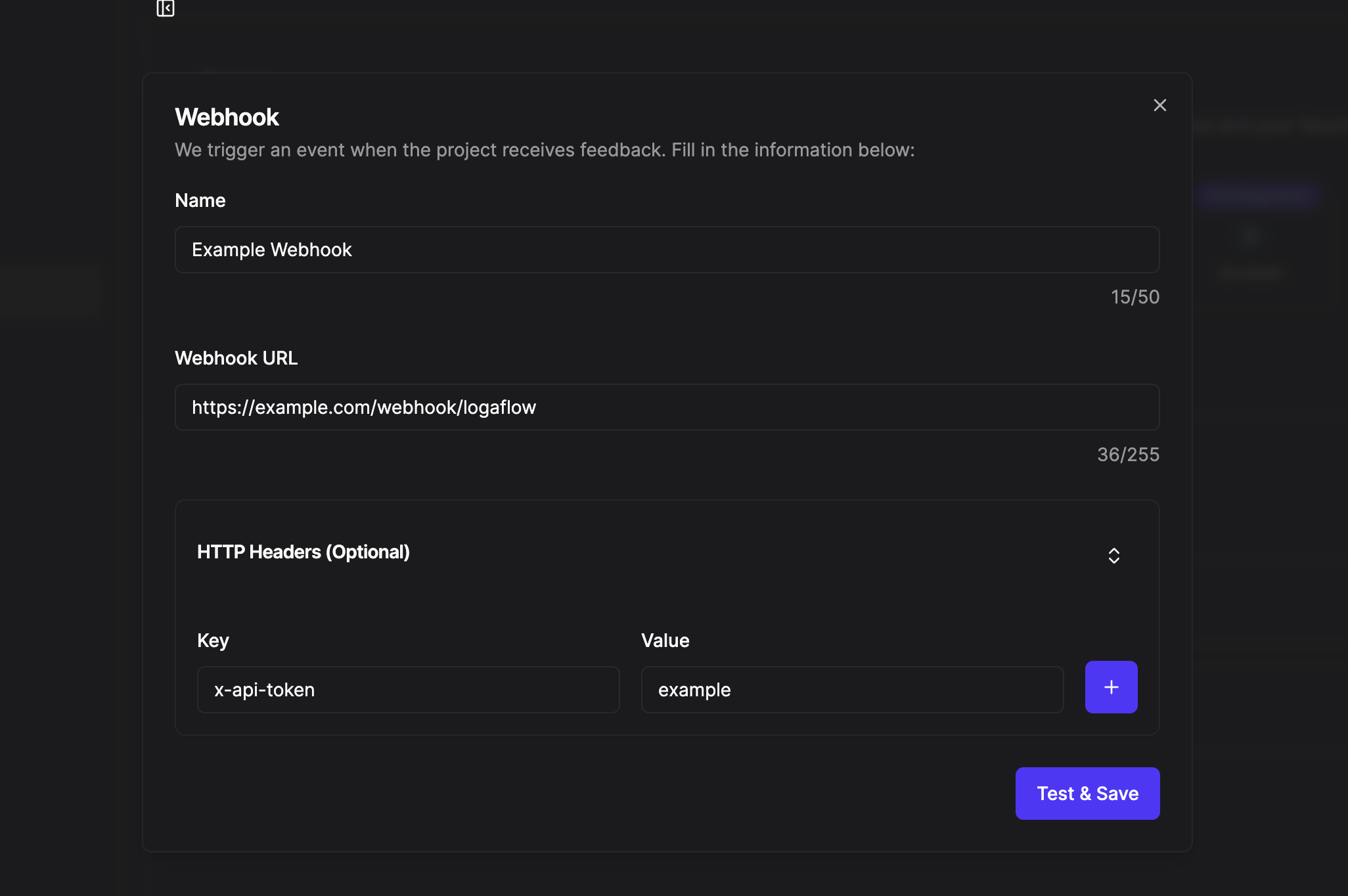
## 1. Connect your webhook to Logaflow
1. Access the [integrations](https://app.logaflow.com/workspace/integrations) tab of the project you want to integrate asn select webhook option.
2. Add a webhook name.
3. Paste your webhook URL.
4. Se precisar adicionar algum cabeçalho para chamar seu webhook, espanda a opção 'HTTP Header (Optional)' e adicione sua chave e valor que deve ir no cabeçalho da chamada ao seu webhook.
5. Click test and save.
 ## 2. Webhook body
The webhook will perform a POST test call to the webhook url provided with the following body:
```JSON theme={null}
{
"comment": "user comment",
"type": "other",
"url": "https://app.logaflow.com/...",
"user": {
"avatar": "https://avatars.githubusercontent.com/u/45521465?v=4",
"email": "jhon.doe@gmail.com",
"id": "123",
"name": "Jhon Doe"
}
}
```
#### Params
Is the comment written in the feedback.
Is the type of feedback, the value of this field can be: bug, idea and other.
Is the url to open the feedback on the logaflow dashboard.
This field will not be null if the feedback creator is authenticated via SSO Auth or has entered the name and email for contact in the Logaflow widget.
This field will only be filled in if the user is authenticated via SSO and the JWT token used to authenticate the user contains this information.
This field will only be filled in if the user is authenticated via SSO or has filled in the Name field in the widget.
This field will only be filled in if the user is authenticated via SSO or has filled in the Email field in the widget.
This field will only be filled in if the user is authenticated via SSO and the JWT token used to authenticate the user contains this information.
## 2. Webhook body
The webhook will perform a POST test call to the webhook url provided with the following body:
```JSON theme={null}
{
"comment": "user comment",
"type": "other",
"url": "https://app.logaflow.com/...",
"user": {
"avatar": "https://avatars.githubusercontent.com/u/45521465?v=4",
"email": "jhon.doe@gmail.com",
"id": "123",
"name": "Jhon Doe"
}
}
```
#### Params
Is the comment written in the feedback.
Is the type of feedback, the value of this field can be: bug, idea and other.
Is the url to open the feedback on the logaflow dashboard.
This field will not be null if the feedback creator is authenticated via SSO Auth or has entered the name and email for contact in the Logaflow widget.
This field will only be filled in if the user is authenticated via SSO and the JWT token used to authenticate the user contains this information.
This field will only be filled in if the user is authenticated via SSO or has filled in the Name field in the widget.
This field will only be filled in if the user is authenticated via SSO or has filled in the Email field in the widget.
This field will only be filled in if the user is authenticated via SSO and the JWT token used to authenticate the user contains this information.