> ## Documentation Index
> Fetch the complete documentation index at: https://docs.logaflow.com/llms.txt
> Use this file to discover all available pages before exploring further.
# SSO Auth
## Introduction
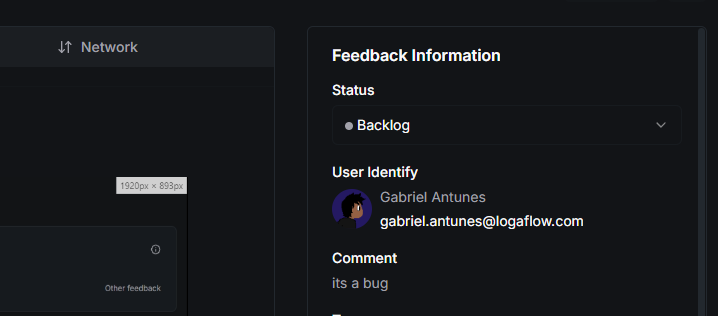
With Logaflow's SSO Auth Token, you can authenticate your users logged into your application to identify them on the Logaflow dashboard.
This step is optional, but we recommend implementing it to better manage each user's feedback. Since they are already authenticated, users with SSO Token will not see the Name and Email fields when opening the Logaflow widget.
## Requirements
* Access to your [project's secret](https://app.logaflow.com/workspace/settings) in Logaflow.
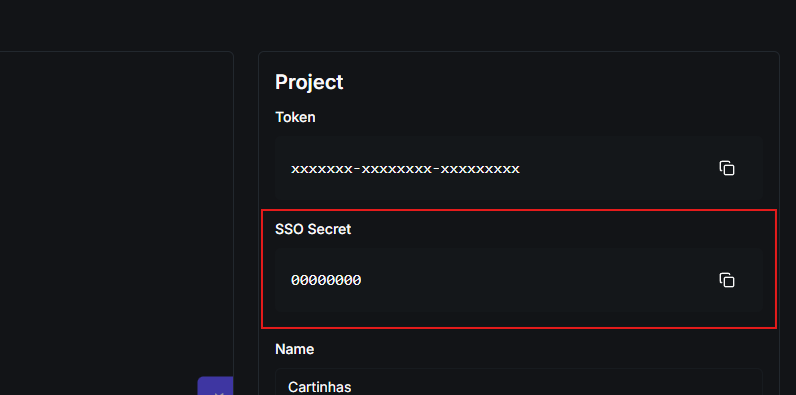 * [Generate and pass](#how-to-implement-sso-auth) jwt token to Logaflow widget
## How to implement SSO auth
On your server, you will need to generate a JWT token signed with your [Logaflow project's secret](https://app.logaflow.com/workspace/settings). Below is an example of how to generate this token:
```typescript example.ts theme={null}
import jwt from 'jsonwebtoken';
const LOGAFLOW_PROJECT_SECRET = "YOUR_LOGAFLOW_PROJECT_SSO_SECRET";
interface User {
id?: string;
name: string;
email: string;
avatar?: string;
}
function generateLogaflowUserSSOToken(u: User): string {
const payload = {
id: u.id || '', // optional
name: u.name, // required
email: u.email, // required
avatar: u.avatar || '' // optional
};
return jwt.sign(payload, LOGAFLOW_PROJECT_SECRET, { algorithm: 'HS256' });
}
```
```go example.go theme={null}
package example
import (
"fmt"
"github.com/golang-jwt/jwt/v5"
)
var LOGAFLOW_PROJECT_SECRET = "YOUR_LOGAFLOW_PROJECT_SSO_SECRET"
type User struct {
Name string
Email string
Avatar string
ID string
}
func GenerateLogaflowUserSSOToken(u User) (string, error) {
token := jwt.NewWithClaims(jwt.SigningMethodHS256, jwt.MapClaims{
"id": u.ID, // optional
"name": u.Name, // required
"email": u.Email, // required
"avatar": u.Avatar, // optional
})
t, err := token.SignedString([]byte(LOGAFLOW_PROJECT_SECRET))
return t, err
}
```
```php example.php theme={null}
require 'vendor/autoload.php';
use Firebase\JWT\JWT;
$LOGAFLOW_PROJECT_SECRET = "YOUR_LOGAFLOW_PROJECT_SSO_SECRET";
class User {
public $name;
public $email;
public $avatar;
public $id;
public function __construct($name, $email, $avatar = null, $id = null) {
$this->name = $name;
$this->email = $email;
$this->avatar = $avatar;
$this->id = $id;
}
}
function generateLogaflowUserSSOToken($user) {
global $LOGAFLOW_PROJECT_SECRET;
$payload = array(
"id" => $user->id, // optional
"name" => $user->name, // required
"email" => $user->email, // required
"avatar" => $user->avatar // optional
);
return JWT::encode($payload, $LOGAFLOW_PROJECT_SECRET, 'HS256');
}
```
```java Example.java theme={null}
import io.jsonwebtoken.Jwts;
import io.jsonwebtoken.SignatureAlgorithm;
class User {
String id;
String name;
String email;
String avatar;
User(String name, String email, String avatar, String id) {
this.name = name;
this.email = email;
this.avatar = avatar;
this.id = id;
}
}
public class GenerateToken {
private static final String LOGAFLOW_PROJECT_SECRET = "YOUR_LOGAFLOW_PROJECT_SSO_SECRET";
public static String generateLogaflowUserSSOToken(User user) {
return Jwts.builder()
.claim("id", user.id) // optional
.claim("name", user.name) // required
.claim("email", user.email) // required
.claim("avatar", user.avatar) // optional
.signWith(SignatureAlgorithm.HS256, LOGAFLOW_PROJECT_SECRET.getBytes())
.compact();
}
}
```
```python example.py theme={null}
import jwt
LOGAFLOW_PROJECT_SECRET = "YOUR_LOGAFLOW_PROJECT_SSO_SECRET"
class User:
def __init__(self, name, email, avatar=None, user_id=None):
self.name = name
self.email = email
self.avatar = avatar
self.id = user_id
def generate_logaflow_user_sso_token(user):
payload = {
"id": user.id, # optional
"name": user.name, # required
"email": user.email, # required
"avatar": user.avatar # optional
}
token = jwt.encode(payload, LOGAFLOW_PROJECT_SECRET, algorithm="HS256")
return token
```
```csharp Example.cs theme={null}
using System;
using System.IdentityModel.Tokens.Jwt;
using System.Security.Claims;
using Microsoft.IdentityModel.Tokens;
using System.Text;
class User
{
public string Name { get; set; }
public string Email { get; set; }
public string Avatar { get; set; }
public string Id { get; set; }
public User(string name, string email, string avatar = null, string id = null)
{
Name = name;
Email = email;
Avatar = avatar;
Id = id;
}
}
class Program
{
private const string LOGAFLOW_PROJECT_SECRET = "YOUR_LOGAFLOW_PROJECT_SSO_SECRET";
static string GenerateLogaflowUserSSOToken(User user)
{
var claims = new[]
{
new Claim("id", user.Id ?? ""), // optional
new Claim("name", user.Name), // required
new Claim("email", user.Email), // required
new Claim("avatar", user.Avatar ?? "") // optional
};
var key = new SymmetricSecurityKey(Encoding.UTF8.GetBytes(LOGAFLOW_PROJECT_SECRET));
var creds = new SigningCredentials(key, SecurityAlgorithms.HmacSha256);
var token = new JwtSecurityToken(
claims: claims,
signingCredentials: creds
);
return new JwtSecurityTokenHandler().WriteToken(token);
}
}
```
To authenticate your user in the widget, you need to pass the generated token to the Logaflow widget:
```html HTML theme={null}
...
>
...
```
```tsx React theme={null}
import React from 'react'
import ReactDOM from 'react-dom/client'
import { LogaflowWidget, useLogaflowSSOAuth } from '@logaflow/react'
import '@/styles/globals.css'
ReactDOM.createRoot(document.getElementById('root')!).render(
<>
{/* Add the logaflow widget to the top of your react project */}
)
function YourApp() {
const { setSSOAuth } = useLogaflowSSOAuth()
useEffect(() => {
// ... your rule to get user sso token
setSSOAuth(token)
}, [setSSOAuth])
...
}
```
```tsx Next theme={null}
// components/logaflow-sso-auth.tsx
"use client"
import { useLogaflowSSOAuth } from '@logaflow/next'
export function LogaflowSSOAuth() {
const { setSSOAuth } = useLogaflowSSOAuth()
useEffect(() => {
// ... your rule to get user sso token
setSSOAuth(token)
}, [])
}
// import and add the LogaflowSSOAuth component in any location after the LogaflowWidget setup component
```
After these steps, your user will be authenticated and you will be able to identify them in the feedback sent by them on the feedback details page:
* [Generate and pass](#how-to-implement-sso-auth) jwt token to Logaflow widget
## How to implement SSO auth
On your server, you will need to generate a JWT token signed with your [Logaflow project's secret](https://app.logaflow.com/workspace/settings). Below is an example of how to generate this token:
```typescript example.ts theme={null}
import jwt from 'jsonwebtoken';
const LOGAFLOW_PROJECT_SECRET = "YOUR_LOGAFLOW_PROJECT_SSO_SECRET";
interface User {
id?: string;
name: string;
email: string;
avatar?: string;
}
function generateLogaflowUserSSOToken(u: User): string {
const payload = {
id: u.id || '', // optional
name: u.name, // required
email: u.email, // required
avatar: u.avatar || '' // optional
};
return jwt.sign(payload, LOGAFLOW_PROJECT_SECRET, { algorithm: 'HS256' });
}
```
```go example.go theme={null}
package example
import (
"fmt"
"github.com/golang-jwt/jwt/v5"
)
var LOGAFLOW_PROJECT_SECRET = "YOUR_LOGAFLOW_PROJECT_SSO_SECRET"
type User struct {
Name string
Email string
Avatar string
ID string
}
func GenerateLogaflowUserSSOToken(u User) (string, error) {
token := jwt.NewWithClaims(jwt.SigningMethodHS256, jwt.MapClaims{
"id": u.ID, // optional
"name": u.Name, // required
"email": u.Email, // required
"avatar": u.Avatar, // optional
})
t, err := token.SignedString([]byte(LOGAFLOW_PROJECT_SECRET))
return t, err
}
```
```php example.php theme={null}
require 'vendor/autoload.php';
use Firebase\JWT\JWT;
$LOGAFLOW_PROJECT_SECRET = "YOUR_LOGAFLOW_PROJECT_SSO_SECRET";
class User {
public $name;
public $email;
public $avatar;
public $id;
public function __construct($name, $email, $avatar = null, $id = null) {
$this->name = $name;
$this->email = $email;
$this->avatar = $avatar;
$this->id = $id;
}
}
function generateLogaflowUserSSOToken($user) {
global $LOGAFLOW_PROJECT_SECRET;
$payload = array(
"id" => $user->id, // optional
"name" => $user->name, // required
"email" => $user->email, // required
"avatar" => $user->avatar // optional
);
return JWT::encode($payload, $LOGAFLOW_PROJECT_SECRET, 'HS256');
}
```
```java Example.java theme={null}
import io.jsonwebtoken.Jwts;
import io.jsonwebtoken.SignatureAlgorithm;
class User {
String id;
String name;
String email;
String avatar;
User(String name, String email, String avatar, String id) {
this.name = name;
this.email = email;
this.avatar = avatar;
this.id = id;
}
}
public class GenerateToken {
private static final String LOGAFLOW_PROJECT_SECRET = "YOUR_LOGAFLOW_PROJECT_SSO_SECRET";
public static String generateLogaflowUserSSOToken(User user) {
return Jwts.builder()
.claim("id", user.id) // optional
.claim("name", user.name) // required
.claim("email", user.email) // required
.claim("avatar", user.avatar) // optional
.signWith(SignatureAlgorithm.HS256, LOGAFLOW_PROJECT_SECRET.getBytes())
.compact();
}
}
```
```python example.py theme={null}
import jwt
LOGAFLOW_PROJECT_SECRET = "YOUR_LOGAFLOW_PROJECT_SSO_SECRET"
class User:
def __init__(self, name, email, avatar=None, user_id=None):
self.name = name
self.email = email
self.avatar = avatar
self.id = user_id
def generate_logaflow_user_sso_token(user):
payload = {
"id": user.id, # optional
"name": user.name, # required
"email": user.email, # required
"avatar": user.avatar # optional
}
token = jwt.encode(payload, LOGAFLOW_PROJECT_SECRET, algorithm="HS256")
return token
```
```csharp Example.cs theme={null}
using System;
using System.IdentityModel.Tokens.Jwt;
using System.Security.Claims;
using Microsoft.IdentityModel.Tokens;
using System.Text;
class User
{
public string Name { get; set; }
public string Email { get; set; }
public string Avatar { get; set; }
public string Id { get; set; }
public User(string name, string email, string avatar = null, string id = null)
{
Name = name;
Email = email;
Avatar = avatar;
Id = id;
}
}
class Program
{
private const string LOGAFLOW_PROJECT_SECRET = "YOUR_LOGAFLOW_PROJECT_SSO_SECRET";
static string GenerateLogaflowUserSSOToken(User user)
{
var claims = new[]
{
new Claim("id", user.Id ?? ""), // optional
new Claim("name", user.Name), // required
new Claim("email", user.Email), // required
new Claim("avatar", user.Avatar ?? "") // optional
};
var key = new SymmetricSecurityKey(Encoding.UTF8.GetBytes(LOGAFLOW_PROJECT_SECRET));
var creds = new SigningCredentials(key, SecurityAlgorithms.HmacSha256);
var token = new JwtSecurityToken(
claims: claims,
signingCredentials: creds
);
return new JwtSecurityTokenHandler().WriteToken(token);
}
}
```
To authenticate your user in the widget, you need to pass the generated token to the Logaflow widget:
```html HTML theme={null}
...
>
...
```
```tsx React theme={null}
import React from 'react'
import ReactDOM from 'react-dom/client'
import { LogaflowWidget, useLogaflowSSOAuth } from '@logaflow/react'
import '@/styles/globals.css'
ReactDOM.createRoot(document.getElementById('root')!).render(
<>
{/* Add the logaflow widget to the top of your react project */}
)
function YourApp() {
const { setSSOAuth } = useLogaflowSSOAuth()
useEffect(() => {
// ... your rule to get user sso token
setSSOAuth(token)
}, [setSSOAuth])
...
}
```
```tsx Next theme={null}
// components/logaflow-sso-auth.tsx
"use client"
import { useLogaflowSSOAuth } from '@logaflow/next'
export function LogaflowSSOAuth() {
const { setSSOAuth } = useLogaflowSSOAuth()
useEffect(() => {
// ... your rule to get user sso token
setSSOAuth(token)
}, [])
}
// import and add the LogaflowSSOAuth component in any location after the LogaflowWidget setup component
```
After these steps, your user will be authenticated and you will be able to identify them in the feedback sent by them on the feedback details page:
## Token payload
The JWT token generated in your application must contain the following information:
This field is optional, however, and will only be used to send to your registered webhooks
This field is mandatory and will be used to identify your user within Logaflow and for your registered webhooks
This field is mandatory and will be used to identify your user within Logaflow and for your registered webhooks
This field is optional and will only be used to improve the experience in Logaflow and will also be sent to your registered webhooks